> ## Documentation Index
> Fetch the complete documentation index at: https://docs.enfuce.com/llms.txt
> Use this file to discover all available pages before exploring further.
# Card PIN Control API
> Endpoint for managing an access token used to view or set PIN. This is a PCI DSS Category 2 service.
# Introduction
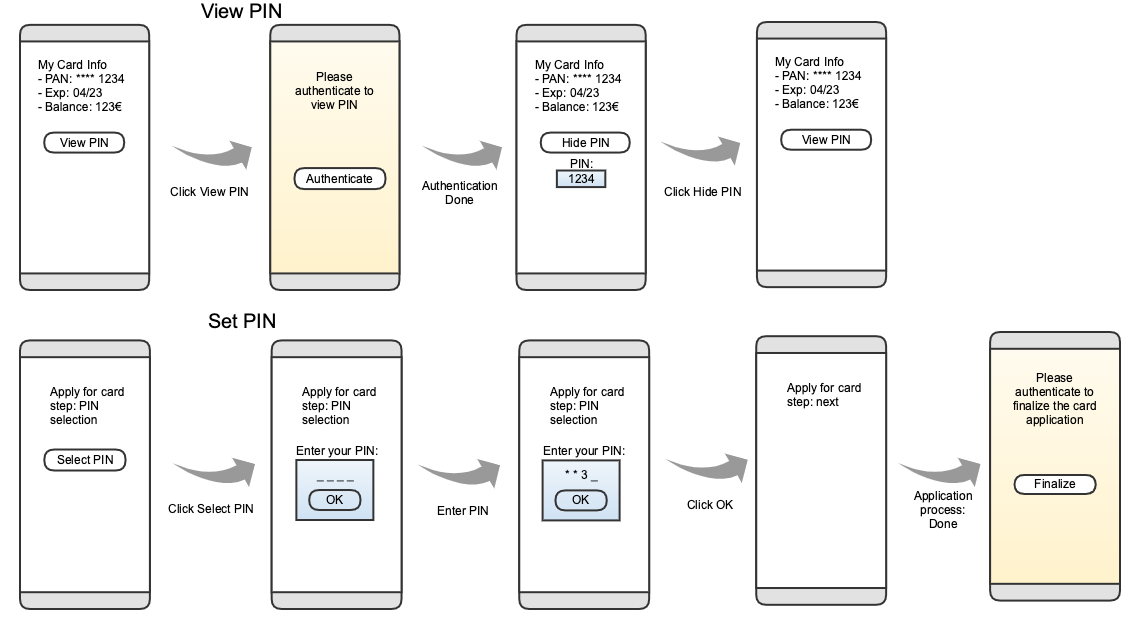
This service enables the cardholders to access their PIN using their device, through an App, or through a web interface. The user is able to do two different things with this access token:
* View PIN
* Set PIN (this is usable at card application time, before the card has been produced)
 ## Flow
There are two main stages of the flow.
1. Requesting a PIN Control access token (this is done using this web service).
2. Instructing the cardholder's mobile device webview or desktop browser to access a certain URL to view or set PIN.
The service is designed to avoid exposure of sensitive data, therefore the PIN is sent directly from the service endpoint to the card holder device.
## Default CSS for View PIN
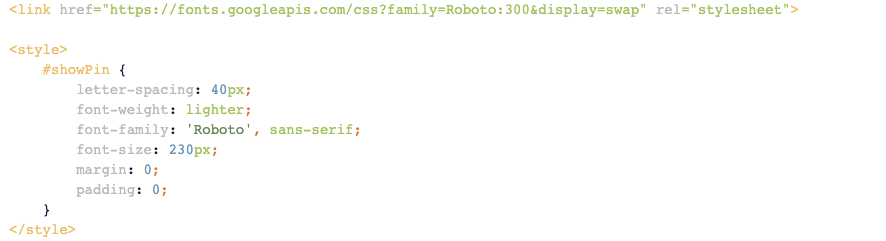
When using web interface to access PIN it is possible to style the corresponding HTML page. The default styling is shown below. Note that it is possible to customize this.
## Flow
There are two main stages of the flow.
1. Requesting a PIN Control access token (this is done using this web service).
2. Instructing the cardholder's mobile device webview or desktop browser to access a certain URL to view or set PIN.
The service is designed to avoid exposure of sensitive data, therefore the PIN is sent directly from the service endpoint to the card holder device.
## Default CSS for View PIN
When using web interface to access PIN it is possible to style the corresponding HTML page. The default styling is shown below. Note that it is possible to customize this.
 ## View/Set PIN page callbacks for mobile devices
View/Set PIN pages provide following callbacks for interacting with the native application.
For Android the javascript interface name is *android\_handler*. Listed below are all the callbacks that can be implemented.
Example call:
```js theme={null}
window.android_handler.pin_valid(true);
```
For iOS, the message handler name is *ios\_handler*. And the posted message body will contain *event*-field containing the callback name and possibly *pin\_valid*-field.
Example call:
```js theme={null}
window.webkit.messageHandlers.ios_handler.postMessage({
event: "pin_valid",
pin_valid: true,
});
```
**view\_pin\_success()** called when PIN is successfully shown.
**view\_pin\_error()** called when there was an error viewing PIN.
**set\_pin\_success()** called when PIN is successfully set.
**set\_pin\_error()** called when there was an error setting up the web page or setting of the PIN failed. The flow should be restarted.
**set\_pin\_validation\_error()** called when set PIN was tried, but PIN was invalid.
**pin\_valid(valid)** called everytime when input field is updated. Boolean parameter *valid* is true if PIN is valid.
**set\_pin()** can be called by native app to initiate set PIN.
## View/Set PIN page callbacks in desktop browser flow
The iframe will *window\.postMessage()* events back to the parent page. Events are the same as in mobile device flow and the format is the same as for iOS as described above.
For any questions, contact us:
* [Enfuce Support Portal](https://enfuce.atlassian.net/servicedesk/customer/portal/6)
* [Enfuce website](https://enfuce.com)
## Authentication
Basic authentication is used to authenticate towards Enfuce API. It is described in more detail in RFC 7617.
| | |
| :------------------------- | :---- |
| Security Scheme Type: | HTTP |
| HTTP Authorization Scheme: | basic |
## View/Set PIN page callbacks for mobile devices
View/Set PIN pages provide following callbacks for interacting with the native application.
For Android the javascript interface name is *android\_handler*. Listed below are all the callbacks that can be implemented.
Example call:
```js theme={null}
window.android_handler.pin_valid(true);
```
For iOS, the message handler name is *ios\_handler*. And the posted message body will contain *event*-field containing the callback name and possibly *pin\_valid*-field.
Example call:
```js theme={null}
window.webkit.messageHandlers.ios_handler.postMessage({
event: "pin_valid",
pin_valid: true,
});
```
**view\_pin\_success()** called when PIN is successfully shown.
**view\_pin\_error()** called when there was an error viewing PIN.
**set\_pin\_success()** called when PIN is successfully set.
**set\_pin\_error()** called when there was an error setting up the web page or setting of the PIN failed. The flow should be restarted.
**set\_pin\_validation\_error()** called when set PIN was tried, but PIN was invalid.
**pin\_valid(valid)** called everytime when input field is updated. Boolean parameter *valid* is true if PIN is valid.
**set\_pin()** can be called by native app to initiate set PIN.
## View/Set PIN page callbacks in desktop browser flow
The iframe will *window\.postMessage()* events back to the parent page. Events are the same as in mobile device flow and the format is the same as for iOS as described above.
For any questions, contact us:
* [Enfuce Support Portal](https://enfuce.atlassian.net/servicedesk/customer/portal/6)
* [Enfuce website](https://enfuce.com)
## Authentication
Basic authentication is used to authenticate towards Enfuce API. It is described in more detail in RFC 7617.
| | |
| :------------------------- | :---- |
| Security Scheme Type: | HTTP |
| HTTP Authorization Scheme: | basic |