

Key benefits of enabling this service:
- Your customer can make online purchases immediately after onboarding, without a physical card.
- Safe and convenient way for your customers to access payment data when needed. No need to write sensitive details on a post-it note, for instance, since the information is always available on the go.
- Easy and fast implementation to your systems with a well-designed API.
- Security and PCI compliance: Designed to avoid exposure of sensitive, PCI-categorised data to the web/app back-end. The functionality is developed, assessed, and certified for PCI DSS.
Retrieval of card data process
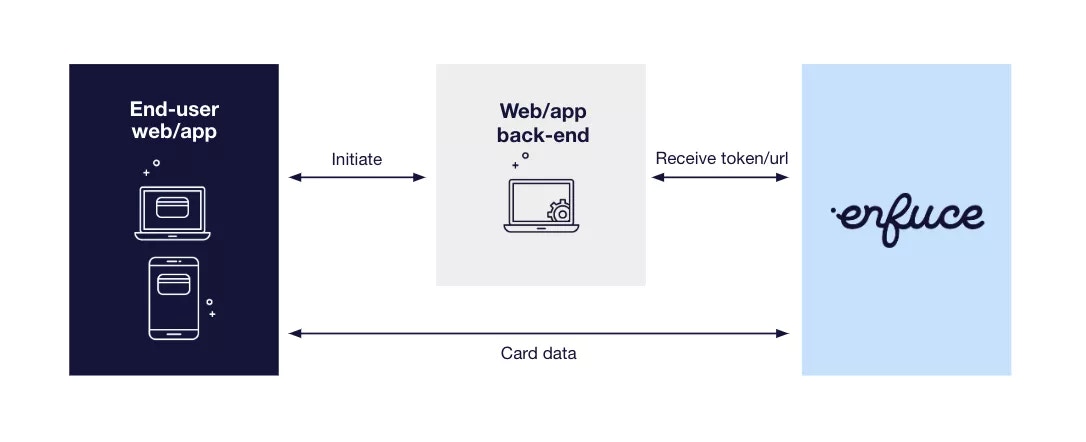
- Your customer initiates the request to get card data from a web or mobile application after completing SCA.
- The web/app back-end requests a token and a URL-delivered unique cardId from Enfuce which it returns to the web/app.
- With the token and URL, the web/app requests the card data.
- The card data is returned with an HTML snapshot that contains the full card number, expiration date and CVV2/CVC2. You can design the app to display the information in accordance with your own web/app design.
Layout Customisation
Enfuce enables you to customise visual layouts. You can determine the visual layout you want for displaying the card data to your cardholders. You can render different co-brands, customer segments, or other specific variations.Discuss with your customer onboarding manager, if you want a specific visual layout for displaying the card data.
- When a cardholder wants to view card data for completing ecommerce transactions, a
POSTrequest is sent to the Initiate Card Data Endpoint endpoint. - In the endpoint response, a token (
token) is returned along with two URLs —cardDataURLfor mobile applications andcardDataFrameURLfor iframes. - To access the card data, the cardholder accesses a specific URL, based on where they are accessing the card data (mobile or web).
- This generates another API request, where the following are included:
- Token previously returned in the Initiate Card Data Endpoint response.
-
layoutVariantparameter (optional) — the value that you have discussed with your onboarding manager is sent in the request.
If you have not mentioned any specific layout, the card data is rendered in the default layout configured for your business. This ensures full backward compatibility for existing integrations and also provides more flexible options in UI customisations.